
A Quick Post About Migrating On-Prem GitHub Enterprise Servers
This will be a really quick post, because I’d like to share this with anyone who is dealing with a GitHub Enterprise Server (GHE) migration. This is for specifically a GHE -> GHE migration. The use case is we have an air-gapped GHE server in one domain and we are standing up a new one in another domain. We will have to migrate all of the repositories and the Actions as well.
Luckily it seems like GitHub has planned for this kind of thing, even though their documentation doesn’t lay out how to specifically do this, you can piece together how it should work. The first piece of info I looked at was their documentation called: Exporting migration data from GitHub Enterprise Server. This seemed to be promising, but it appears (to me) that you have to add all the repositories manually on export. The environment I’m working in isn’t huge, but I’m lazy and don’t really want to deal with that.
After this I decided to just go ahead and stand up the new server because I was kind of under a time crunch and noticed on the setup screen there were a few options when configuring the new host: The Choose installation type setup screen I was greeted with during the initial installation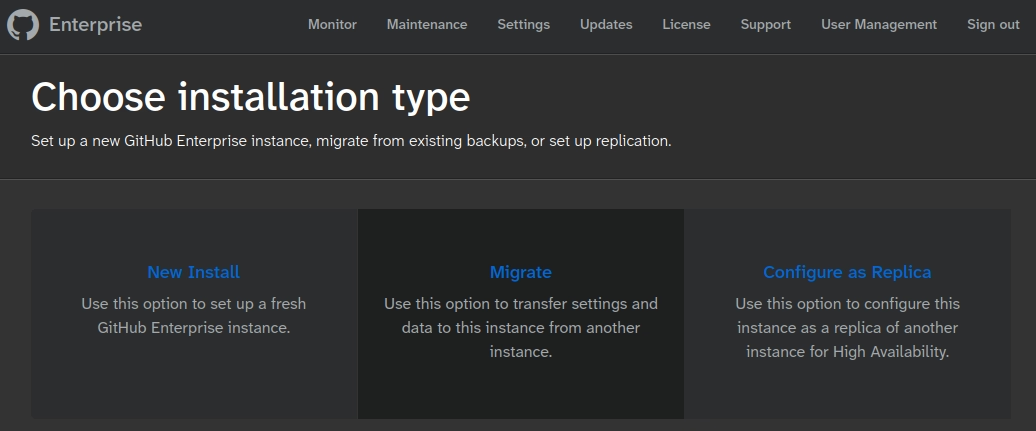
I noticed that one option was “Migrate” and thought, “That’s exactly what I’m trying to do!”. So I chose that option, the next screen lets you add your SSH keys to the host so you can connect (as the restore happens over SSH), and finally you are greeted with one final screen that has a single command to run: The single mysterious ghe-restore command for performing the migrationghe-restore <hostname>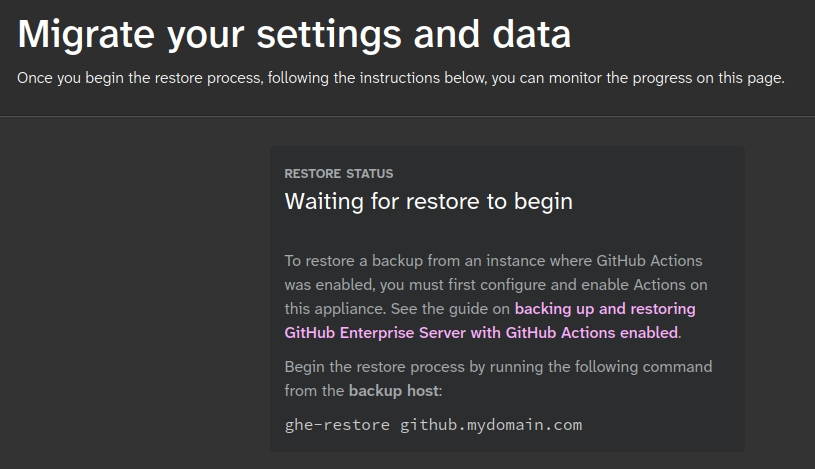
After my DuckDuckgo-foo I found out the ghe-restore command is part of the backup-utils that GitHub makes. This also includes the ghe-backup command and how to use it. The setup is super easy, I just followed their Getting Started README and I was ready to roll! Just a note, I tried installing the backup-utils on the old GHE server and when you run the ./bin/ghe-backup command it complains that it’s an appliance and the backup server needs to be a separate instance. So I re-installed the backup-utils on my local machine and started the backup. I ran the ./bin/ghe-backup command on my host and it.. failed. You also need to install the rsync and jq packages on the “backup server” as well. I installed the dependencies and it worked!
Ten minutes later I had a full snapshot of my old GHE host. I then ran the command that the above photo told me to to migrate my data: ./bin/ghe-restore github.mydomain.com and it.. worked! It took probably 20 minutes, but it migrated all of my data over and restarted the service. I finally had to go into the settings and change everything like FQDN, NTP, Auth, Actions, etc. to the settings for the new host. But after saving the settings the new host works like a charm and has all of the old data as well.
Because this is an option, I also wanted to test Delta restores as well. This will allow me to setup a blackout date on the old GHE so I can then migrate the delta from my initial snapshot and the blackout date. To test I made a new repository on the old host, re-ran the ghe-backup command to create a new backup snapshot, and then re-ran the ghe-restore command to hopefully bring in the new repo I created. This also worked like a charm.
I thought I’d outline this because I didn’t really find any documentation for using the backup-utils to migrate from one GHE server to another GHE. There was plenty of info on migrating from GHE -> github.com and GHE -> GH Cloud, but nothing on GHE -> GHE. There is also documentation for the ghe-migration tool.
Some notes when doing this: If you do not have the receiving GHE setup it will inherit all of the configs from the backup like hostname, ntp, dns, auth, etc. This also includes the Master password. So if you have a new Master password on the new GHE, it will be changed to the old GHE Master password. However, during my delta restore, the Master password will still be reset. Other than the Master password, all the previously configured settings are not overwritten by the backup, which is what is expected from the --help page:
Usage: ghe-restore [-cfhv] [--version] [--skip-mysql] [-s <snapshot-id>] [<host>]

Restores a GitHub instance from local backup snapshots.

Note that the GitHub Enterprise host must be reachable and your SSH key must
be setup as described in the following help article:

<https://docs.github.com/enterprise-server/admin/configuration/configuring-your-enterprise/accessing-the-administrative-shell-ssh >

OPTIONS:
  -c | --config       Restore appliance settings and license in addition to
                      datastores. Settings are not restored by default to
                      prevent overwriting different configuration on the
                      restore host.
I hope this helps someone who may be going through a similar air-gapped (offline) GHE -> GHE migration and may be having trouble how to perform this using GitHub’s documentation.